Understanding Network Devices
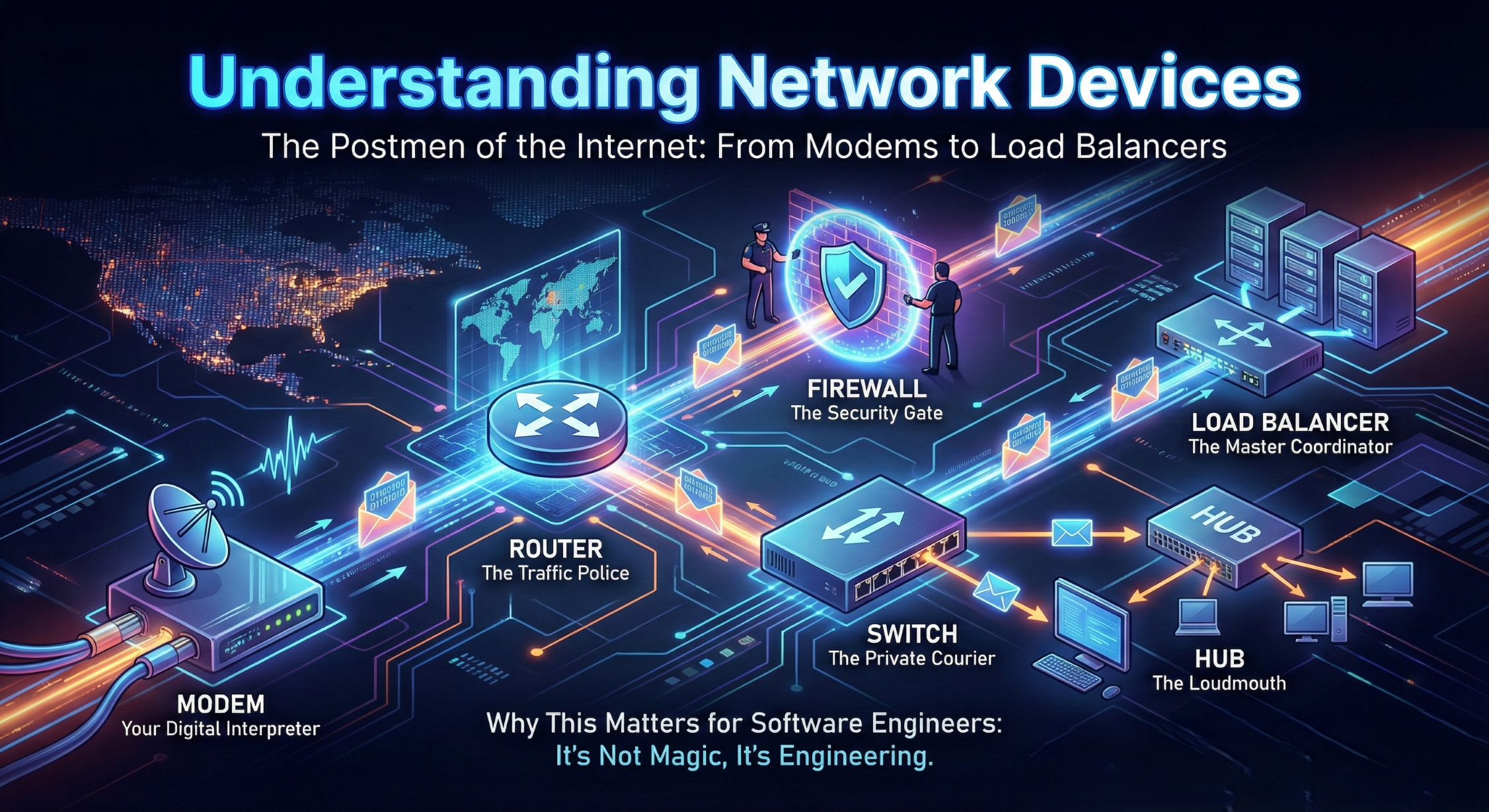
As software engineers, we often treat the network as an abstract utility—like electricity—but understanding the hardware "plumbing" makes you a much better architect when things go south.
Here is a beginner-friendly guide to the gear that keeps the packets flowing.
The Postmen of the Internet: Understanding Network Devices
Have you ever wondered what actually happens between the moment you hit "Enter" on a URL and the moment the page loads? We talk a lot about code, but the real heavy lifting is done by a series of specialized hardware devices.
Let's look at how the internet gets from the street into your application.
1. The Modem: Your Digital Interpreter
The internet usually arrives at your building via fiber optic cables, phone lines, or satellites. However, these signals are often in a format your computer doesn't understand (like light pulses or radio waves).
The Job: A Modem (Modulator-Demodulator) translates the signal from your Internet Service Provider (ISP) into a digital signal your local devices can process.
The Analogy: Think of the Modem as a Universal Translator. If the ISP speaks "Light," and your computer speaks "Binary," the Modem sits in the middle making sure they can understand each other.
2. The Router: The Traffic Police
Once the Modem brings the "raw" internet into your home, the Router takes over. Its primary job is to connect different networks (your home network vs. the public internet) and route traffic between them.
The Job: It looks at the destination IP address of every packet and uses a Routing Table to decide the fastest path for that data to take.
The Analogy: The Router is the Traffic Police at a major intersection. It looks at the GPS destination of every car (packet) and points them toward the right highway so they don't get lost or collide.
3. Switch vs. Hub: How Local Networks Work
Inside your office, you might have ten computers, three printers, and a server. You need a way to connect them all together. This is where the Switch or Hub comes in.
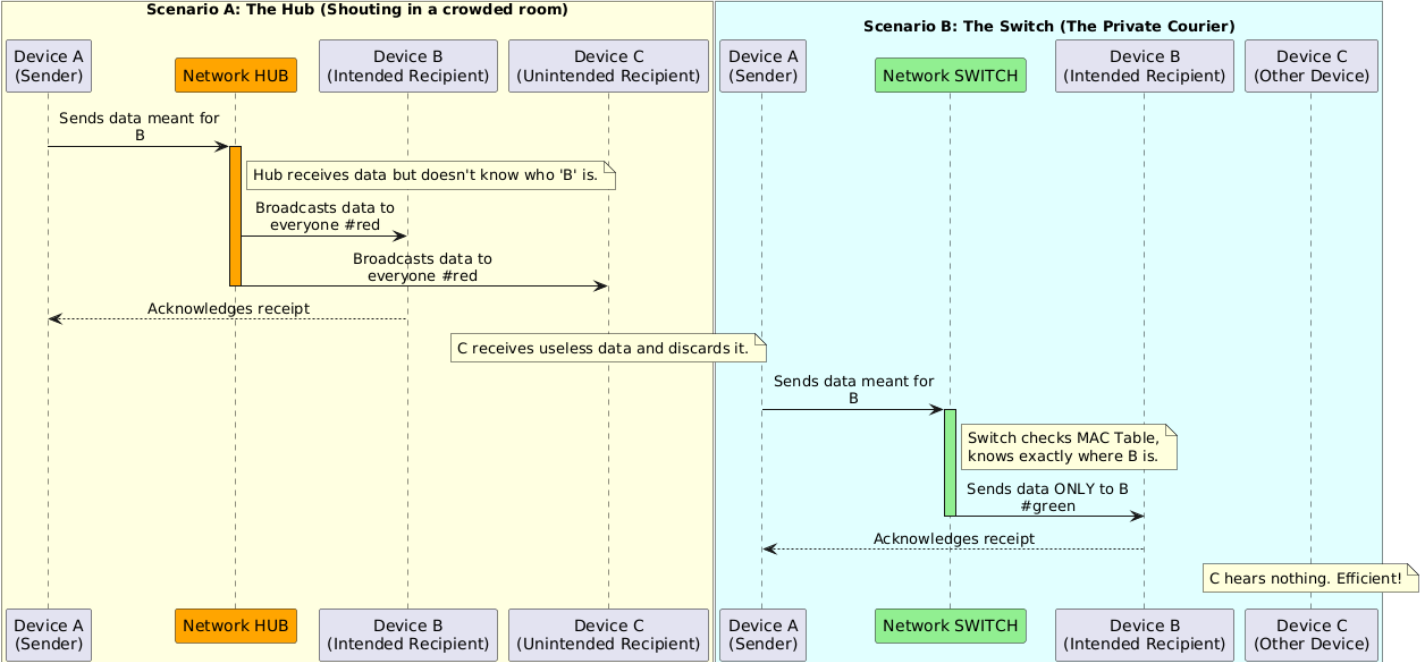
The Hub (The Loudmouth): An older device that sends any data it receives to every device connected to it. It’s inefficient because it creates a lot of unnecessary noise.
The Switch (The Private Courier): A "smart" version of a hub. It learns the unique MAC address of every device. When Computer A sends a file to the Printer, the Switch sends it only to the printer.
The Comparison: A Hub is like shouting a secret in a crowded room; everyone hears it. A Switch is like sending a DM; only the recipient gets the message.
4. The Firewall: The Security Gate
Before a packet from the outside world is allowed to touch your servers, it has to pass the Firewall.
The Job: It monitors incoming and outgoing traffic based on a set of security rules. It blocks unauthorized access while letting legitimate communication pass through.
The Analogy: The Firewall is the Bouncer at a club. It checks the ID of every packet. If the packet is coming from a suspicious location or trying to enter through the wrong "door" (port), the Bouncer kicks it out.
5. The Load Balancer: The Master Coordinator
In a small home setup, you don't need this. But for software engineers building scalable systems, this is vital. When millions of people visit a site, one server can't handle the load.
The Job: A Load Balancer sits in front of a "pool" of servers. It receives incoming requests and distributes them evenly across the servers so no single one gets overwhelmed.
The Analogy: Think of a Bank Teller Line. Instead of everyone rushing one teller, the Load Balancer (the floor manager) directs the next person in line to the next available teller to keep the flow moving.
How it All Works Together: A Real-World Setup
In a production environment, your request follows a very specific path:
Internet enters through the Modem.
The Firewall inspects the request for threats.
The Router directs the request to the correct internal department.
The Load Balancer picks the healthiest server to handle your request.
The Switch physically delivers the data to that specific server.
Why This Matters for Software Engineers
When you're debugging a "Connection Timed Out" error, it’s often not your code—it’s a misconfigured Firewall rule or a Load Balancer that thinks your server is "unhealthy." Knowing this hardware stack helps you step out of the IDE and understand the actual environment where your code lives.
The Bottom Line: It’s Not Magic, It’s Engineering
As developers, it’s easy to think of the internet as an abstract cloud where our code lives. But the reality is that every API call, database query, and page load relies on this physical relay race.
From the Modem translating languages to the Load Balancer managing the crowds, these devices form the invisible backbone of your applications. Understanding this "plumbing" doesn't just make you a network nerd—it makes you a better Full Stack Engineer.
The next time your application times out or throws a connection error, you won't just blame the code. You’ll ask: Is the Firewall blocking the port? Is the Load Balancer misconfigured? Or is the Router sending packets to a dead end?
Welcome to the world of networking—where the virtual meets the physical.
Hope this blog has helped you in some way.
Happy Learning!


